At a customer in automation engineering, dispatching runs through the schedule board of Project Operations. Every tab the dispatchers see at the top is a record in the Schedule Board Setting table: a few dozen columns, a JSON with time scale, working hours, row heights, schedule types and requirement panels, the saved filter values, and three references to configuration records of their own, namely filter layout, resource cell template and retrieve resources query. The test environment has eight such boards: three from the system, the initial public view and four custom ones. Whoever needed a fifth for a new team has so far rebuilt one by hand.
The tool that already existed
Microsoft provides a FastTrack control for this table, Schedule Board Settings Management. It can read, copy, delete and activate boards, and it cannot edit them. That would be bearable if the copy were complete. It is not: the control only takes keys whose name starts with msdyn_, and the three references to the configurations are named differently in the Web API. They fall away. In the customer's test environment that is exactly where the custom configurations sit, the filter layout for Project Operations and the custom retrieve resources query. A copy without them is a board that filters differently from the original, and nobody sees at first glance why.
Then there is protection. The control recognizes the system boards by their name. The share type “System” and the fixed identifiers of Universal Resource Scheduling are the better criterion, with one exception I only saw in the test environment: the initial public view has a different identifier in every environment and sits there on “Just me”. So it is recognized by its name after all, in three languages, and protected from deletion.
A field only filters once the query knows its key.
Editing without touching the JSON
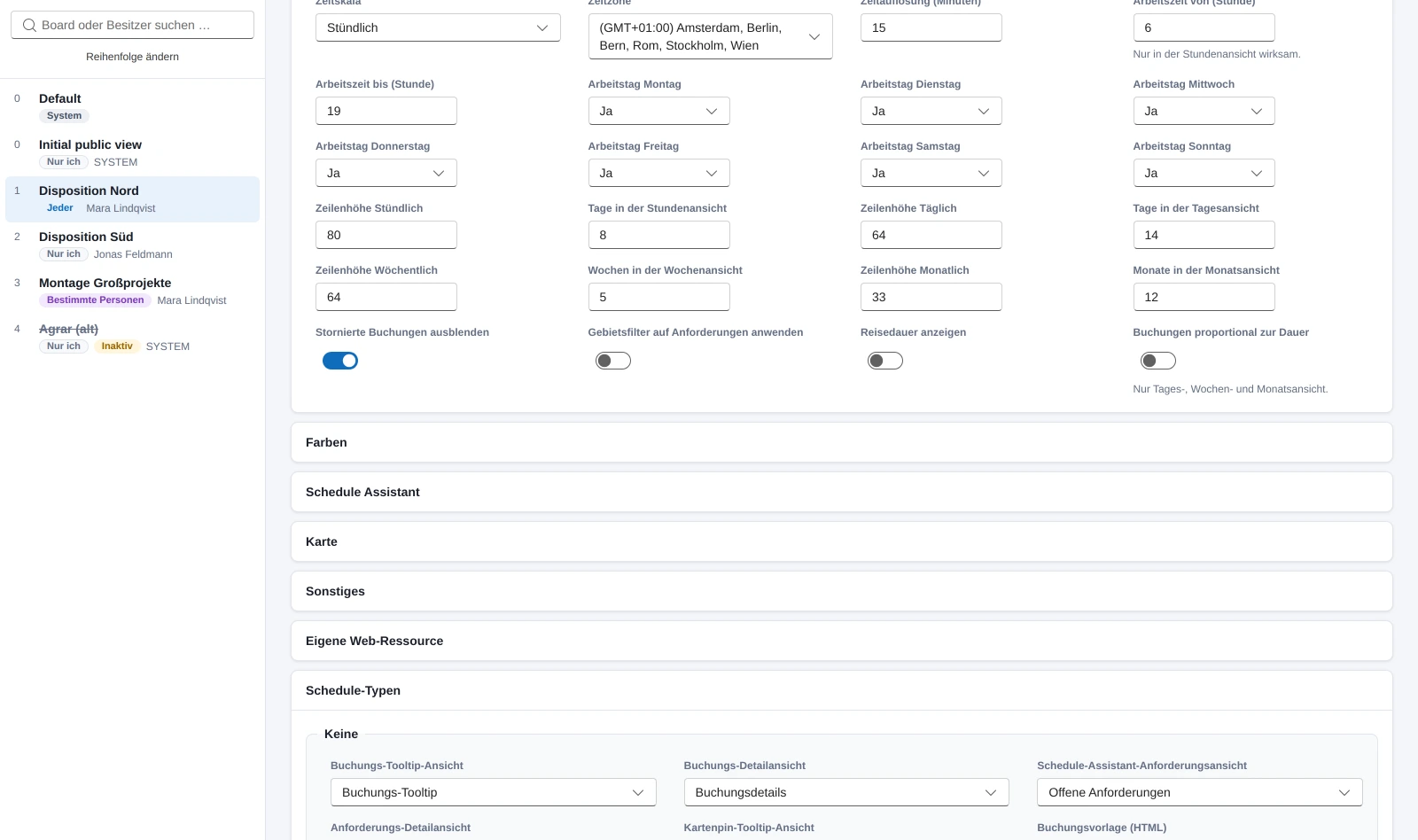
On October 1 this became a code app. The copy takes the three references along, optionally the record shares too, and “System” becomes “Everyone”, because a copy is never a system board. The form follows the field mapping Microsoft documents for the settings: board view, colors, schedule assistant, map, other, schedule types, requirement panels. What a board does not set, it inherits from the default board, and the form shows the inherited value instead of an empty field.
The rule that carries the editor is not in the field mapping: the JSON is never rebuilt. The editor changes exactly the path someone touched and leaves every other key alone. There are plenty of them, undocumented groupings, hidden legends, the copies of the schedule assistant configurations inside the schedule types. Switches the board only knows as a present key are removed when switched off and not set to zero, because the board itself does it that way. And before every save there is the diff down to the single value; only the changed columns are written, and before that the app checks the version number. That is necessary because the schedule board itself writes the settings back on every view change. Whoever clicks in the board and saves in the app at the same time would otherwise overwrite the other.
Four boards, one filter layout
The fields on the left in the board's resource filter are not in the board. They sit as XML in the configuration record behind the filter layout reference, and in the test environment four boards share the same record. Whoever changes a field there changes it for all four. The app therefore shows above the editor which boards share the layout and offers to create a copy for the current board only and assign it. Only the top-level fields are edited; unknown attributes and nested elements stay as they are, and the diff runs over the field's key, so that pure formatting is not a change.
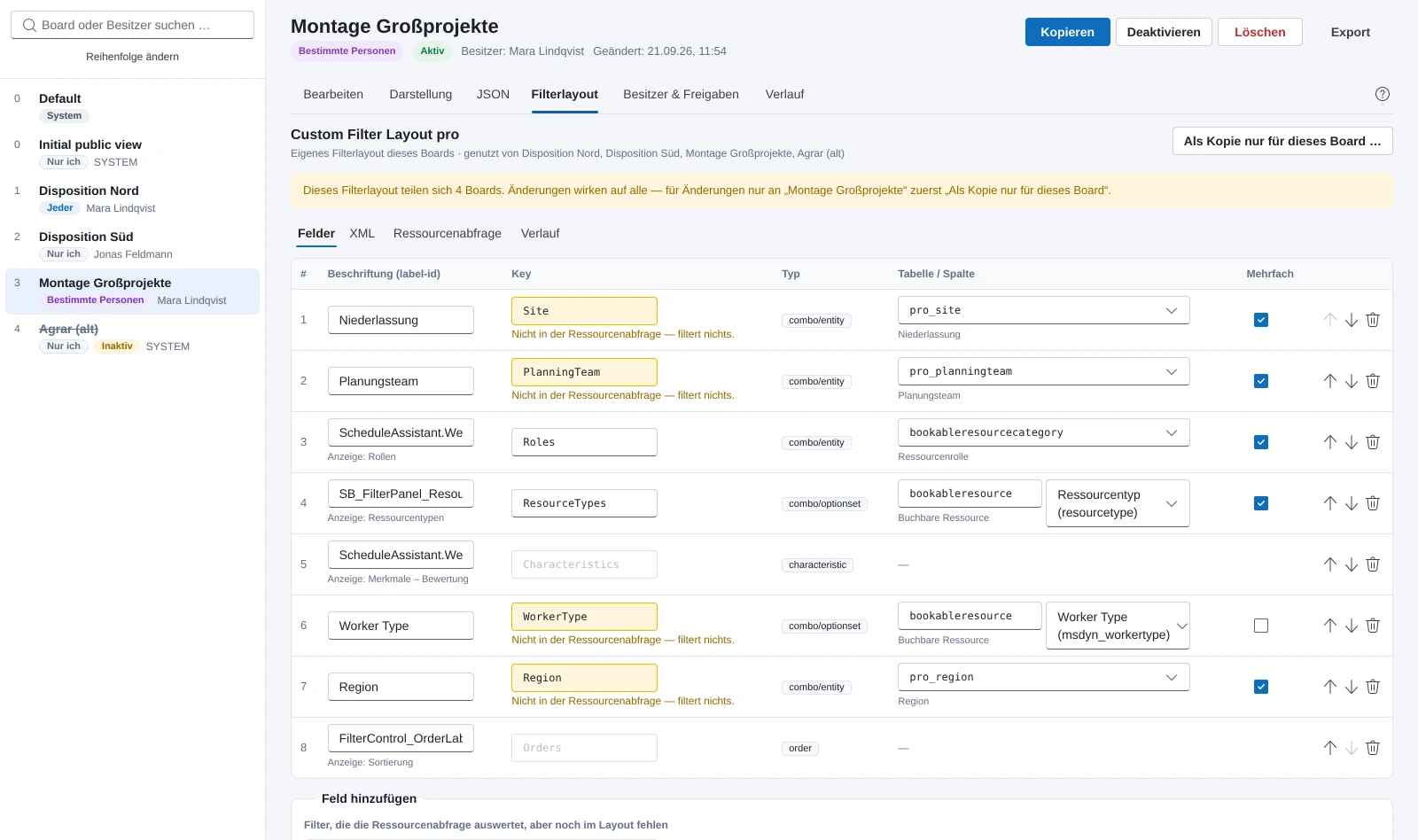
The second finding was less pleasant. A field in the filter layout only filters once the retrieve resources query evaluates its key as an input. Creating a field is easy, and afterwards it looks just like the others. It just does nothing. So the app reads the board's retrieve resources query, or the inherited one of the default board, and marks every field without a counterpart as “filters nothing”. The other way round, it lists every key the query knows and the layout lacks, with its effect in plain words, and prefills kind, table, column and label when you accept it. The query itself is parsed by a small tag scanner instead of an XML parser, because the queries often do not declare the prefix of their namespace and a strict parser then bails out.
Sharing with the user's permissions
Boards with “Specific people” are only seen by those who have a share. The app shows the shares, changes the level between read and write and grants new ones, through the Dataverse connector on a connection of the signed-in user. A connection with a service account would have been more convenient, and then any user of the app could share arbitrary boards with its permissions. So every user creates their own connection on first start, and what they may not do, the app may not do either.
The bug of the day was in the people search. It only ran after a click on “Search” and returned at most fifteen hits. A first name with three letters produced eighteen in the test environment, and the person being searched for was in the list only by chance. Since that afternoon the search runs by itself a quarter of a second after the last keystroke, every word has to occur in name or email, hits whose name starts with the term come first, and at twenty-five there is a note to keep typing. The same afternoon the owner change arrived, for one board and for several at once, as the way to hand a “Just me” board over to someone else. Access teams are missing from that search because they cannot own anything.
On the evening of October 1 the app was running in the customer's test environment. What the dispatcher sees of all this, booking tile, resource cell and colors, and how a board gets from there to production, is part two. All features are on the product page.