The booking template of a schedule board is a piece of HTML with placeholders in curly braces. The resource cell is a Handlebars template in a configuration record of its own. The tooltips are identifiers of views. Until October 1 all of that could be edited in the app as free text, and whether the result looked good in the board only showed after saving, in the board, with real bookings. For a template that four boards share, that is not a workflow, that is an experiment on the dispatch team.
A preview that does not lie
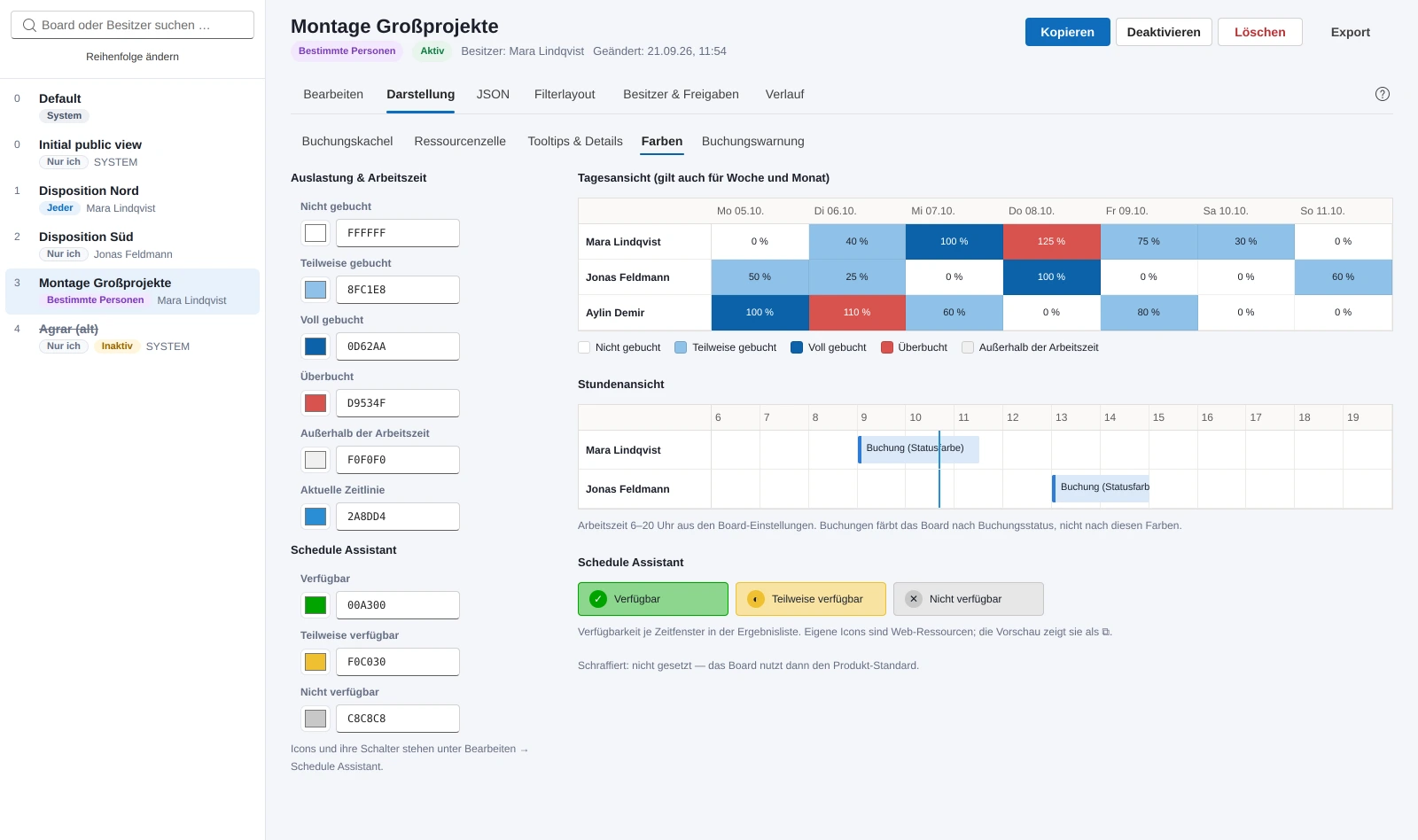
On the evening of October 1 the “Appearance” tab arrived. It shows every visible setting of a board next to a preview: the booking tile per schedule type in an hourly view with duration, status color and row height, the resource cell in four states and in the schedule assistant's view, the tooltips from the columns of the configured views, the colors, the booking alert. Fields for the tile are picked by click across the booking's relationships, and the app assembles the path from the schema names the way the template expects it. The designer says whether a template belongs to the board, is inherited from the default board or whether the product default applies, and it checks for JavaScript and wrong placeholders.
Two decisions made the preview more expensive than it had to be. Template HTML from Dataverse runs in a frame with an empty sandbox attribute, no scripts, no access to the app, no CSS leaking out. And the cell template is rendered by a small Handlebars interpreter of my own instead of the library, because the library compiles its templates with dynamically generated code, and I do not want that in an app that displays other people's templates. Only the helpers from Microsoft's samples are reproduced. Everything else is reported rather than guessed. The preview approximates the board, no more: the board's CSS is not available outside the board, and I checked the fidelity against Microsoft's samples, not against the customer's templates.
A board consists almost entirely of identifiers, and only some of them are the same in every environment.
Four hundred pixels missing in the host
Locally the tab looked fine. In the test environment, inside the Power Apps host, it was squeezed: template editor without line wrapping, preview with scrollbars, a cut-off color preview. The breakpoints hung on the window width, and in the host the frame and the board list take away around four hundred pixels. So two columns stayed, although the space was not there. Since late evening on October 1 the breakpoints follow the width of the appearance area itself, through container queries, and below around 1500 pixels code, preview and field list sit one below the other. The same day the UI had moved to Fluent UI v9, the same library the Power Apps modern controls are built on, because the native browser controls looked dated next to Power Apps. One trap from that stays documented: the Fluent provider copies its class onto every popup, and whoever hangs their base styles on that class gets an empty overlay over the whole page.
On October 2 the builder arrived. The booking template had been a large, mostly empty text field with raw HTML. But the real templates almost always have the same shape: a frame, rows with an icon or text and a bold field, separated by line breaks. That can be edited without HTML. One row per tile row, fields as chips with display names from the metadata, text in small input fields, bold per part by click. The serializer writes back in the style of the existing template, with its frame attributes, its spelling of the bold tag and the line break, so that the diff only shows the change. Templates built differently open as HTML. I checked the builder against all templates from the customer's test environment without loss; the test for that lives outside the repo because it contains the templates.
Turning identifiers back into names
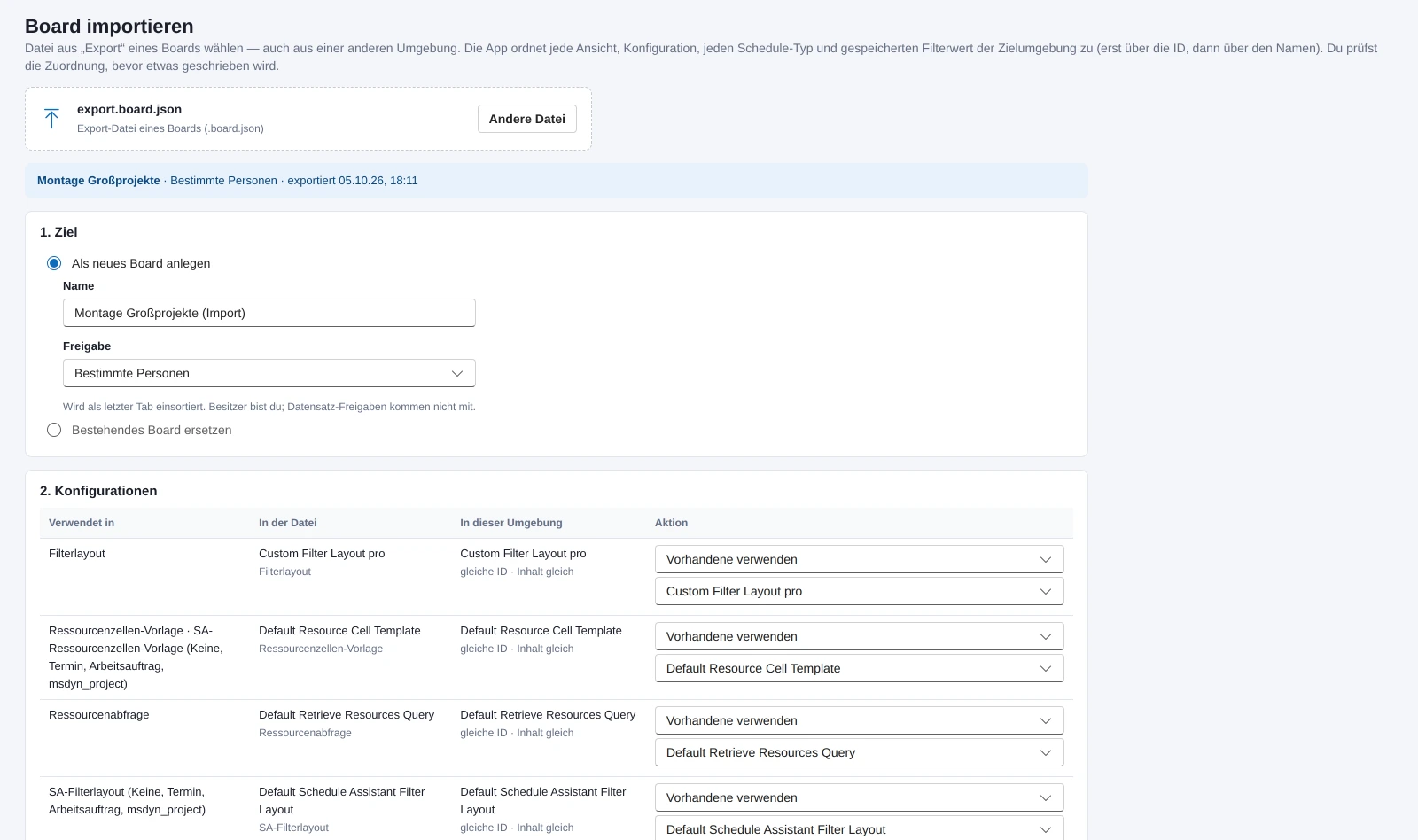
The board is supposed to go from the test environment to production. The first export had only written the board's JSON, and that is useless: a board consists almost entirely of identifiers, and only some of them are the same in every environment. Views from solutions and the standard configurations of Universal Resource Scheduling carry the same identifier everywhere, the custom configurations, the booking setups and the records in the saved filters do not. Since October 1 the export writes a package: the board with all columns, every referenced configuration with its content, plus for every identifier what you recognize it by in another environment, name and table of the view, table of the schedule type, name of the time zone, table and primary name of the record.
The import maps every identifier to the target environment, first by identifier, then by name, and shows every row for changing. Configurations are reused, created, overwritten with the file's content or left empty, with a comparison of the content and a warning about which boards still use the record. What has no counterpart drops out cleanly: a view field is emptied, a requirement panel without a view drops out of the settings entirely, instead of staying behind as a dead identifier. The target is a new board or an existing one that gets replaced, with the same diff as on save. Not in the package are shares, owner and history; user identifiers differ per environment, and mapping them via email addresses is on the list.
No board has reached production so far. For that the app has to run there, with its own configuration, and it only does so after an explicit decision by the customer. Since October 2 the app has a help with fifteen sections, as a panel over the app, so that an unsaved draft is not lost while looking something up. Most of it explains what the UI does not show: inheritance from the default board, shared configurations, filter fields without effect. All features are on the product page.