On October 3 this blog said that the first run against the environment with three languages was up next. It happened the same evening, at the customer in the lighting industry, in the development environment. The gap matrix did what it was supposed to do, and still the first piece of feedback was not about the matrix. Whoever translates there knows the forms their users work in, and searches a list of type, component and column for the field they have in mind. Translators think in forms, not in rows. The matrix is a spreadsheet with better filters, and that is exactly what nobody wanted to operate any more.
What the environment showed first
Before the designer came the sobering part. Three assumptions from the first version did not survive first contact. The export action is bound to the solution collection, and the Power Apps command line cannot generate a client for such an action; through the connector the call ran into the timeout. Since then the app registers the native action in its own data sources, and the same route later serves the metadata reads for choice values. I had modelled the file format on the example in the documentation; in a real export, “Entity name” holds the table's logical name, and whether a row is a form, a view or a column follows from the “Object Column Name” column. Checked against two real exports, then classification, name resolution and test data were changed over. And the time: exporting the customer's core solution took between 2:16 and 2:52 minutes in the app, against a limit of three minutes per call. Since then, loading shows a progress card with steps, elapsed time and a bar measured against the last export duration of the same solution, plus a button that stops the waiting without leaving the app.
Translators think in forms, not in rows.
The way users see it
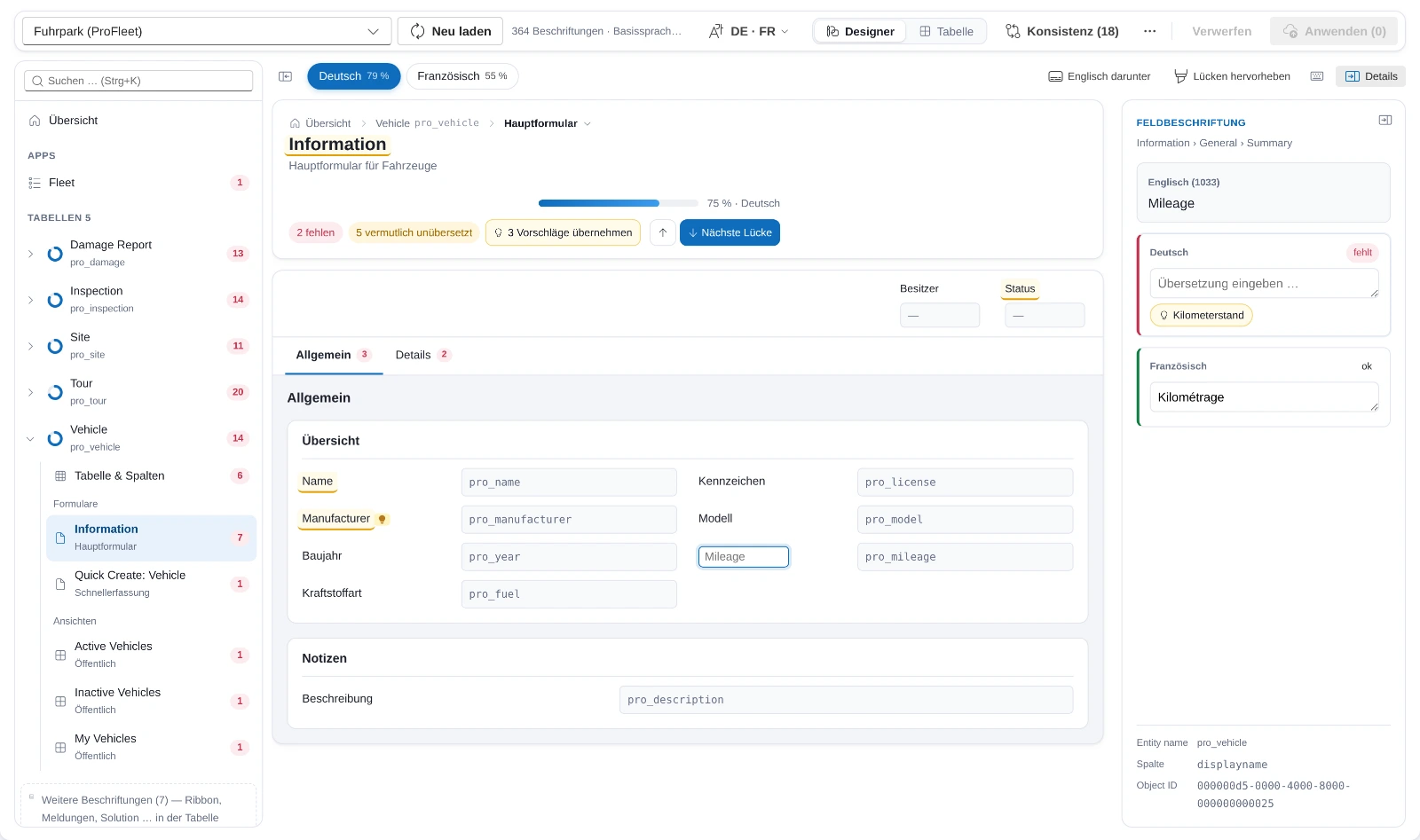
Since October 3 the designer has been the default view after loading, the table is one switch away. On the left the components of the solution: apps, tables with their forms and views, dashboards, each entry with a ring for the share translated and a red number for what is open. In the middle the selected component, built from what the environment delivers live: a form from its formxml with header, tabs, sections and fields, a view from its layoutxml with the column headers, a model-driven app from its sitemap with areas and groups. The texts in them come from the export file, and that is exactly where the designer writes to: the same change list, the same import as from the table. Nothing changed about the route through export and import, only about what you see along the way.
Translating then means: click, type, Enter. Tab applies and jumps to the next gap, across form tabs too. Ctrl+Enter says “correct as is” for the cases where the German word equals the English one. If the same base text is already translated elsewhere, a light bulb hangs on the field, and the head of the page offers to apply all suggestions on this page at once. On the right, the details show the selected label in all target languages side by side; whoever does not need them hides them and gets the width for the form. That was the first correction after the first look: with the details fixed open, a real form squeezed into three narrow columns, and the field names broke in the middle of a word.
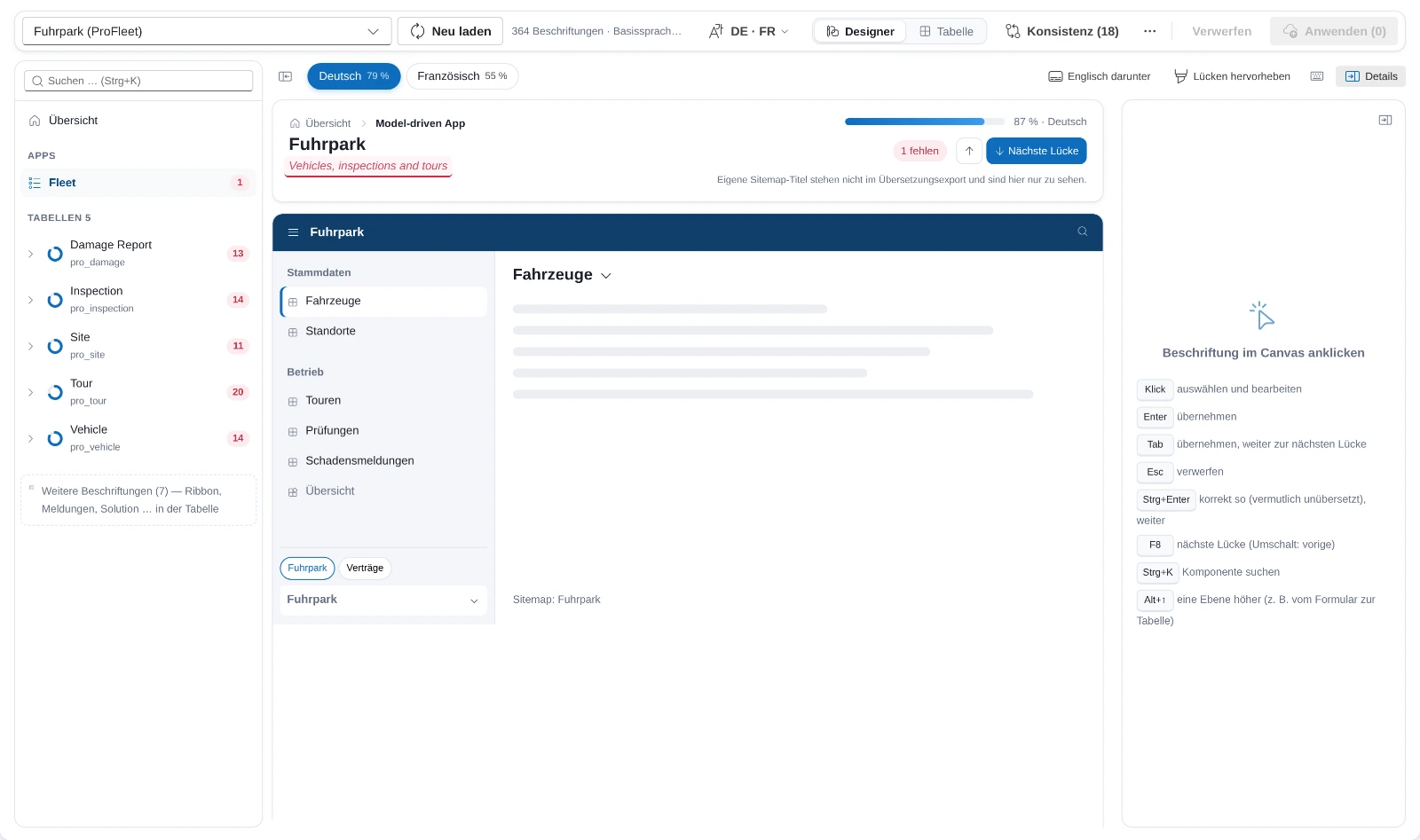
The dashed red line is the limit I would rather not have. Titles of sitemap areas, and custom form texts that differ from the column name, are not part of the translation export. The designer shows them so that the picture is complete, and does not write them, because the import does not know them. That would take a second write path directly to the sitemap, and whether I want that is open. Until then, the head of the page says that these titles are maintained in the app designer.
What the big numbers did to the designer
The first version recomputed states, counters and glossary suggestions over all rows after every keystroke, about 280 milliseconds at 60,000 rows, and then re-rendered every label. You do not notice that on a form with twenty fields, and you notice it a lot on a table with 260 columns. Since October 4 the app recomputes only the changed rows and their glossary group, with a test that holds the result against the full computation. The designer builds its structure once from the loaded file; texts and states flow through a store of their own, and an edit re-renders only the labels and counters it touches.
Then the test with the customer's core solution: 228 tables, 701 forms, 1,726 views, 8 apps, 10 dashboards. Applying 29 suggestions at once and reverting them takes under a second. What else the real data showed was in no mock. Solution names that wrapped over three lines in the picker. A table with more than 80 forms and views whose tiles pushed the columns down; now the ones with open labels come first, the rest sits behind “show all”. A neighbour menu in the breadcrumb that was longer than the screen. And the Sales Hub showed “no sitemap”, because the app's unique name is not its sitemap's; the mapping has since gone through the app components, with the name match only as the fallback. The breadcrumb itself, by the way, was a consequence of hiding: whoever collapsed the component list and went from a table into a form had no way back.
The first import
On the evening of October 4 the first real import ran, in a copy of the development environment. The import job took five minutes, from 21:51 to 21:56, and succeeded. The dialog showed a red cross anyway. The call to ImportTranslation is synchronous, and the platform cuts it off after 180 seconds while Dataverse keeps the job running. The app had taken the call for the result. Since then the job decides: a call error with a successful job is a note in the result, a timeout while publishing means “probably still running”, and only when no job is visible one minute after the call does the import count as not started. The asynchronous variant of the action would be cleaner, and it is on the list.
The number I promised in the first post, how many gaps an environment that has grown over years actually has, is still outstanding. The run so far was a test run in a copy, and I will not present a figure from a copy as a finding. It will come with the first pass in the environment where the business department translates. Matrix, CSV route and import are described on the product page.