At a customer in the lighting industry, Dynamics 365 runs in three languages: English as the base, German and French for the national subsidiaries. Every table, every column, every choice value, every form and every view carries its display name per language. Every release adds new columns, and the translation comes when someone remembers. Usually someone remembers when the French subsidiary calls.

The standard way
The route Microsoft provides for this has been the same for many versions. Export translations in the maker portal. You get a zip file with an Excel 2003 XML file inside, one sheet with all labels, one column per language, several thousand rows. You open it in Excel, find the empty cells in the French column, fill them, save without breaking the format, zip it back up, import, publish. XrmToolBox has tools that make the trip to Excel more comfortable. The basic problem remains. The file shows everything, not the gaps. And the business department that actually knows the translations has neither access to the maker portal nor any desire to work in an XML file with forty columns.
I also wanted to see the second kind of gap, the one the export does not even list as a gap: a German cell that contains the English text. Someone copied the base text into all languages when the column was created, so that nothing would be empty, and ever since, the column has been called “Status Reason” in German.
The file shows everything, not the gaps.
The same export, read differently
The decision that shaped everything else was made before the first line of code. A Code App reaches Dataverse through the connector, and the connector can read tables and call actions, but cannot write metadata. I know that from the Admin Console. So no metadata updates, but exactly the export and import that Microsoft provides. One action per direction, and both cover all component types in one format. The studio changes nothing outside that route. The file that goes back is the exported file plus the changed cells: no row removed, nothing re-sorted, formatting and unknown columns stay, and without changes the result is byte-identical to the export. There is a test for that, and it was the first one I wrote.
The matrix sits on top of that. One row per label with type, component and column, the base text read-only, and per target language one cell in one of four states: missing, probably untranslated, changed, ok. “Probably” is meant honestly. “Status” is also German, which is why the cell can be marked as correct instead of the app deciding. Metrics per language sit above, and a click on a number sets the filter.
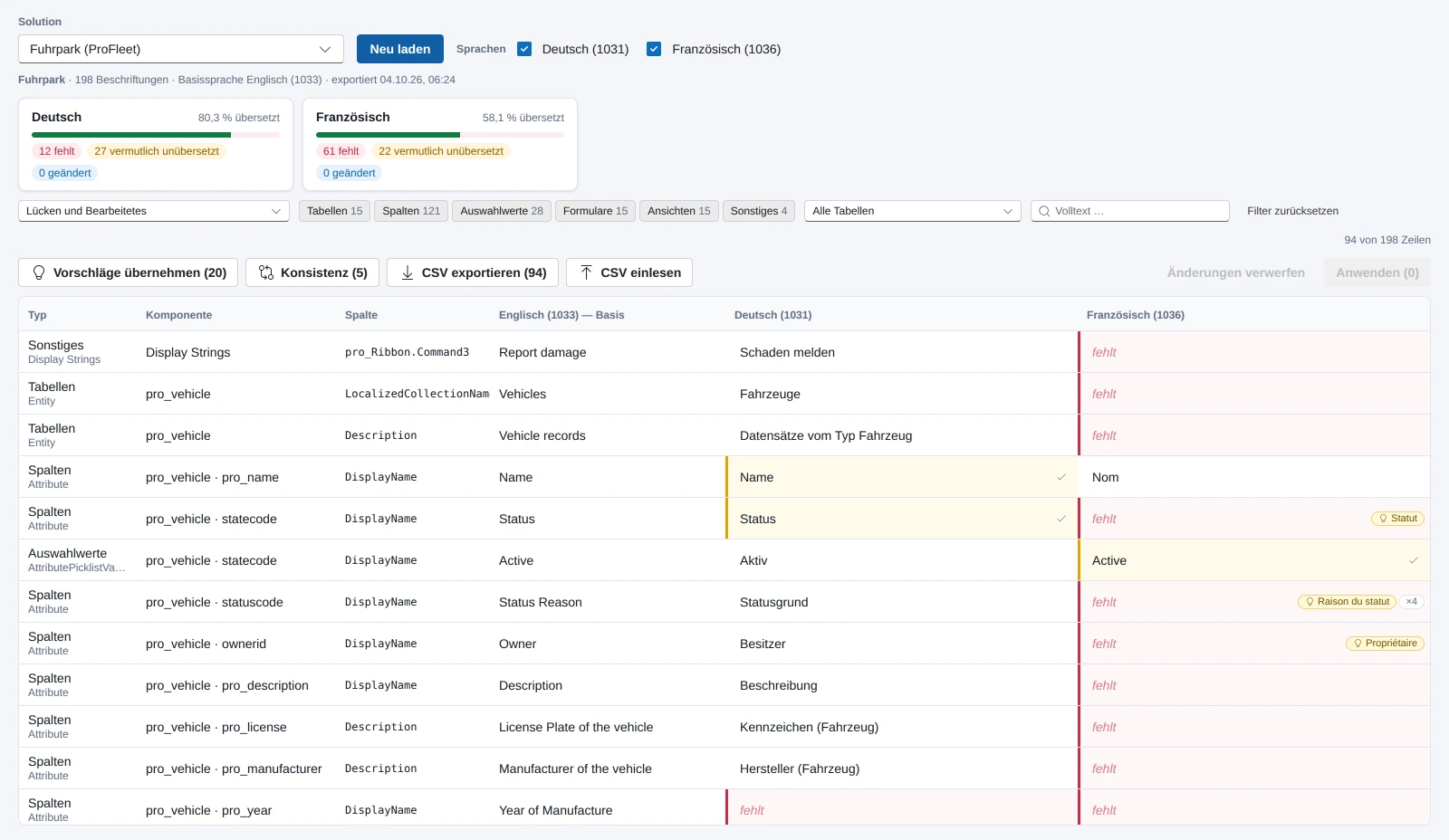
Two things turned out to be more useful during the build than I expected. The glossary: if the same base text is already translated elsewhere, the cell suggests it, and a button applies it to all identical base texts. In the sample data that takes care of a fifth of the gaps, in a real environment with years of customizing probably more. And the consistency report, which finds the same word with two different translations, “Notizen” here and “Anmerkungen” there. That is not a flaw in the export, that is the history of the environment.
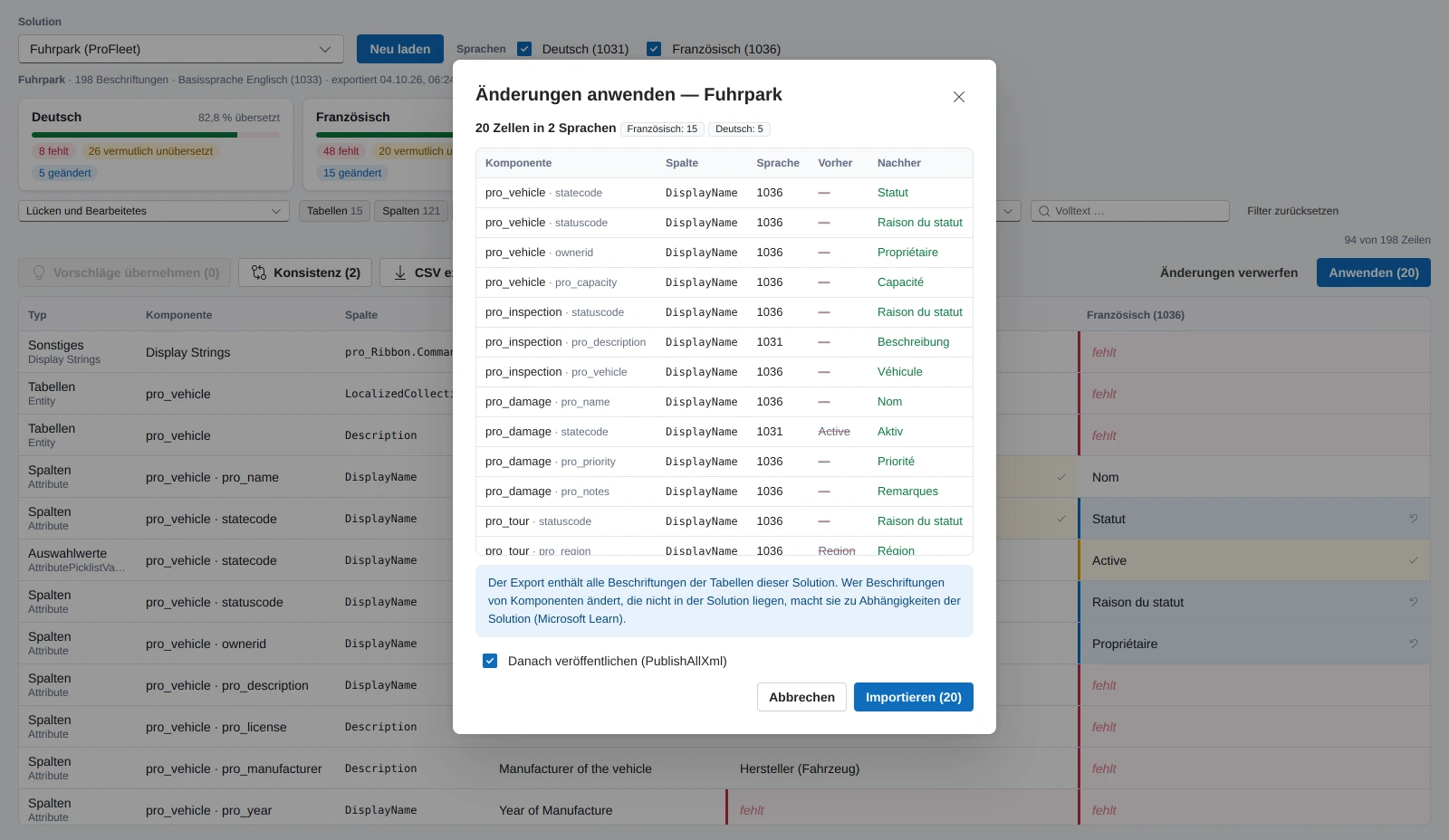
For the business department there is the CSV route. The filtered rows go out, only the gaps, with a stable key per row, and come back filled in. Reading them in shows in advance what changes and what will not be applied. Empty cells mean unchanged. Nobody has to go into the maker portal for this.
What I didn't know
The guardrails are in the code, not in the manual. The base language is never written. An unchanged file is never imported. An existing translation is never cleared, because it is not documented whether an empty cell means “delete” or “unchanged” on import. Texts over 500 characters are rejected, because the import fails on them. One import runs at a time, and while it runs, the matrix is locked.
The last guardrail came out of the code review the same day: for the export, the app tries the next route after an error, native, connector, connector with bound path. For import and publish it only does that if the first route demonstrably does not exist, and never after a timeout. A timeout can mean that the import has long been running on the server. A second route would have started it twice.
What I don't know from the documentation and will only see in the real environment: which of the three routes the export actually takes, whether the default solution can be exported, whether the import job table is readable for a normal user, and how large the file gets for an environment with Sales and Field Service. The app's setup page checks exactly that, and “Test export” shows route, size and languages before you change anything.
Where it stands
The concept and the first version were written today, with tests for scanner, file round trip, gaps, glossary, CSV and import log, and a mock mode in which an import is simulated. The first run against the environment with three languages is up next. After that I will know whether the assumptions above hold, and then there will be a number here: how many gaps an environment that has grown over years actually has. I won't guess one. All features are on the product page.
Addendum, October 5: the first run
The first run took place the same evening. The export goes through the native action, because the command line cannot generate a client for the bound action and the connector runs into the timeout. I had assumed the file format wrong, “Entity name” is the table's logical name. And the first real import ran for five minutes, successfully, while the call was cut off after 180 seconds. What came of it, above all the designer, is in the second post.