After the release train and the checks before the import, the console was a development tool. The questions I got in July came from operations, and they had one thing in common: the maker portal and the admin center answer them either painfully or not at all.
Plugin errors are invisible
Dataverse writes plugin traces to a table that is practically unusable in the maker portal. If you want to know whether a plugin is throwing exceptions right now, you use the Plugin Trace Viewer from XrmToolBox. It is good. It just runs only on a desktop, needs a sign-in per environment, and none of the people in operations who ask the question have installed it.
Since July 3 the console has a stream over the trace logs that reloads every fifteen seconds and pauses as soon as the browser tab goes into the background. Filtering happens on the server by time window, type, message, table, sync or async, optionally exceptions only. The heavy message block only loads when you expand a row, never in the stream. On top of that, a timeline per correlation ID that shows which plugin triggered which, and runtime aggregates per plugin and message. The question “is it the plugin” now takes a minute to answer instead of an hour.
Nobody uses a tool they have to wait for.
Roles, and what they really do
For permissions there used to be an Excel matrix that someone had once copied from the roles, and the Security Role Explorer in XrmToolBox, which lets you look at a single role. But the question asked on the project is a different one: what can this user actually do, across all of their roles, directly and inherited through teams? And the other way round: who can actually delete this table?
The Role Analyzer answers both. It works on a cached snapshot of the security model, because a mid-sized tenant has close to three hundred roles, about two hundred fifty of them out of the box. It shows the matrix of role, table and privilege with depth, a user's effective rights with the path they come from, the reverse lookup, and hygiene findings such as unassigned roles. Team inheritance was the hard part: the query across teams needs nested conditions the service does not always like, so direct and inherited assignment run as two separate queries. If the second one fails, the inheritance is missing, but the direct check stays correct.
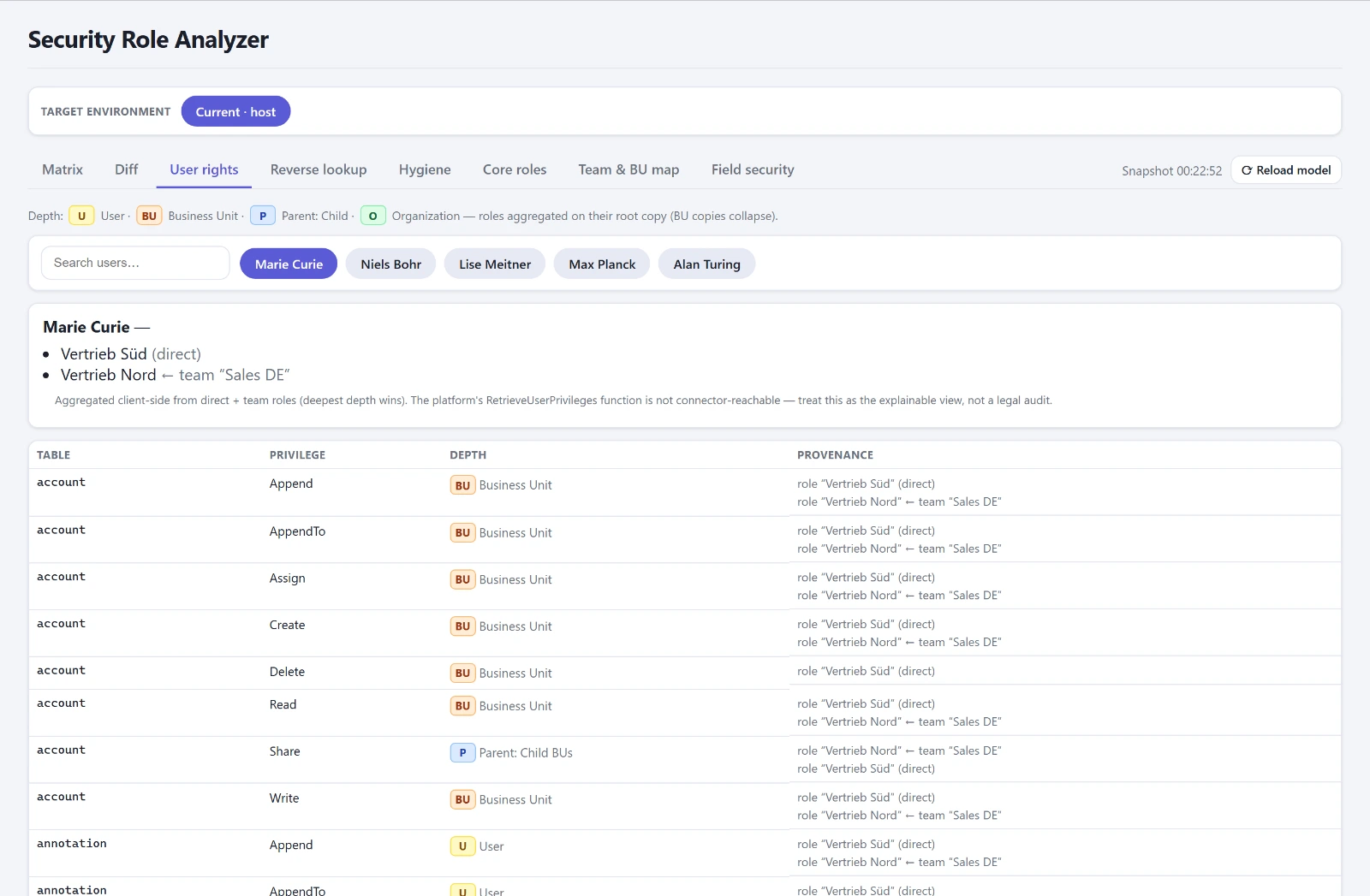
At the end of July the Role Analyzer was out of the app for a week, because it added 120 kilobytes to the bundle and the first start suffered. On August 4 it came back, this time loaded when you open it. My assumption that the Code App player does not serve lazy-loaded chunks was wrong, and only on that day did I check it instead of believing it.
Did the roles arrive intact?
The Role Comparer was built the same day, and it answers the question that occupied me most on the project. A security role that is transported by solution keeps its ID. A role that someone rebuilt by hand in the target, because the transport was not working at the time, has the same name and a different ID. Today it looks right. From tomorrow on it drifts, and no import will ever update this role, because to Dataverse it is a different one.
So the Comparer matches by name, not by ID, and marks identical names with differing IDs as rebuilt. Each cell shows the number of privileges and how many of them this environment grants differently from the reference. An environment that could not be read shows a question mark and never counts as clean. The area is read-only on purpose. A drifting role should be transported, not edited in the target, because that creates exactly the unmanaged layer the Layer Inspector reports afterwards.
That same day it grew: the current state can be frozen as a baseline, and then the question changes from “do the environments match” to “what has changed since the freeze”. A snapshot produces a security concept as a document, with an environment overview and a privilege matrix, and with a second, earlier snapshot a chapter on changes. The document you normally write at the start of a project and never update is now generated. I built an extended baseline with business units, teams and field security the same day and took it out again. Freezing took too long. Nobody uses a tool they have to wait for.
Processes and plugins per environment
“Why isn't the flow running in PROD?” Because it is off. Since when, nobody knows. The Process Comparer shows all process types of a release solution as a status matrix across environments, differing cells highlighted, with on and off per cell and bulk actions on a row selection. It started on July 9 as the Flow Comparer and since July 22 also covers classic workflows, business rules, actions and business process flows. The Plugin Comparer does the same for plugin steps and also shows the assembly version per environment. A step can exist and still run against an older assembly.
On this comparer I learned two things about the connector in one day. A two-option field comes back as a Boolean, not a number, and my code read it as “always off”. And a choice field comes back as a bare number without a label, so since then I get the label from the table of option values. That the second one had an entirely different cause is in the addendum.
Small things that aren't small
Audit Config shows an environment's audit settings down to the column level. A table is only audited if both the organization switch and the table switch are on, so “configured but off” is a finding of its own. User Settings is an inventory of the personal settings of all users per environment, time zone, currency, language, formats, with the option to roll out one user's values to several others, with a stricter confirmation in PROD.
And Dual-Write Maps, since July 6. An environment's table maps with their versions. The first iteration showed the highest version number as the current one. Today it turned out that for three of ninety-one maps the highest number was a parked 9.9.9.9 “Version for Data Migration” that had been displayed since November 2023 and never ran. The running version lives in a different table, and only for half of the maps. Now the row shows the version that is actually running, otherwise the last one saved, and says openly which of the two it is.
The fourth part is about configuration data between environments, a database browser without a toolbox, and how the tool became a product. The Operate group in detail is on the product page.
Addendum, August 17: a forgotten parameter
The bare number in the choice field, an empty owner in the Dual-Write Maps, an empty lookup in the Transfer Hub preview: I had noted these as three quirks of the connector and worked around them three times. It was one. The connector only returns display texts on request, through a third parameter that my call had been passing empty since June. The workarounds stay in place, they work. But the list of quirks is three entries shorter.
Addendum, September 10: filters for effective rights
A user with a handful of roles ends up with several hundred rows of table times action, and nobody reads those from top to bottom. Now you can filter by table, privilege and granting role. The granting roles appear as chips above, each with the number of privileges it contributes. That is the real gain: you see which assignment does the work. A zero stays, just dimmed. A role that grants the user nothing is a finding, not noise.