Price lists, territory assignments, templates, settings tables: configuration data is data, but it belongs to the solution and has to travel the environment chain with it. Solutions do not transport it. For that there is the Configuration Migration Tool from the SDK, with a schema file, export as a zip, import on the desktop. It works. It is just manual work every time, nobody except that one colleague knows the schema file, and there is no schedule, no dry run and no delta. The alternative is Excel imports, and we don't talk about those.
A package, not a run
July 23 was the densest day of the whole project, 37 commits. In the morning a transfer was planned as an external pipeline, by evening it ran as a cloud flow that is installed with the app. The idea: the console describes a transfer package, with target environments and order, and in it entries made of source environment, table, filter and columns, either through a system view or directly as FetchXML with preview and row count. Then record matching by GUID or by up to five business columns, and the question of what happens to target rows the source no longer delivers. Nothing is ever executed in the app's session. A click on Run puts a row into a queue, and the flow picks it up.
The first executor needed 86 seconds for thirty rows. The third version, without variables, 37 seconds, the fourth, with one parent flow per run and one child flow per entry, ten. Along the way you get to know the flow engine: a variable cannot reference itself, nested loops always run sequentially, and a FetchXML query returns exactly 5000 rows, no matter what you set. The last one is dangerous. A truncated read with deletion of orphaned rows turned on would have deleted everything in the target above the limit. So when the executor hits the limit, it aborts and writes nothing, instead of writing partially.
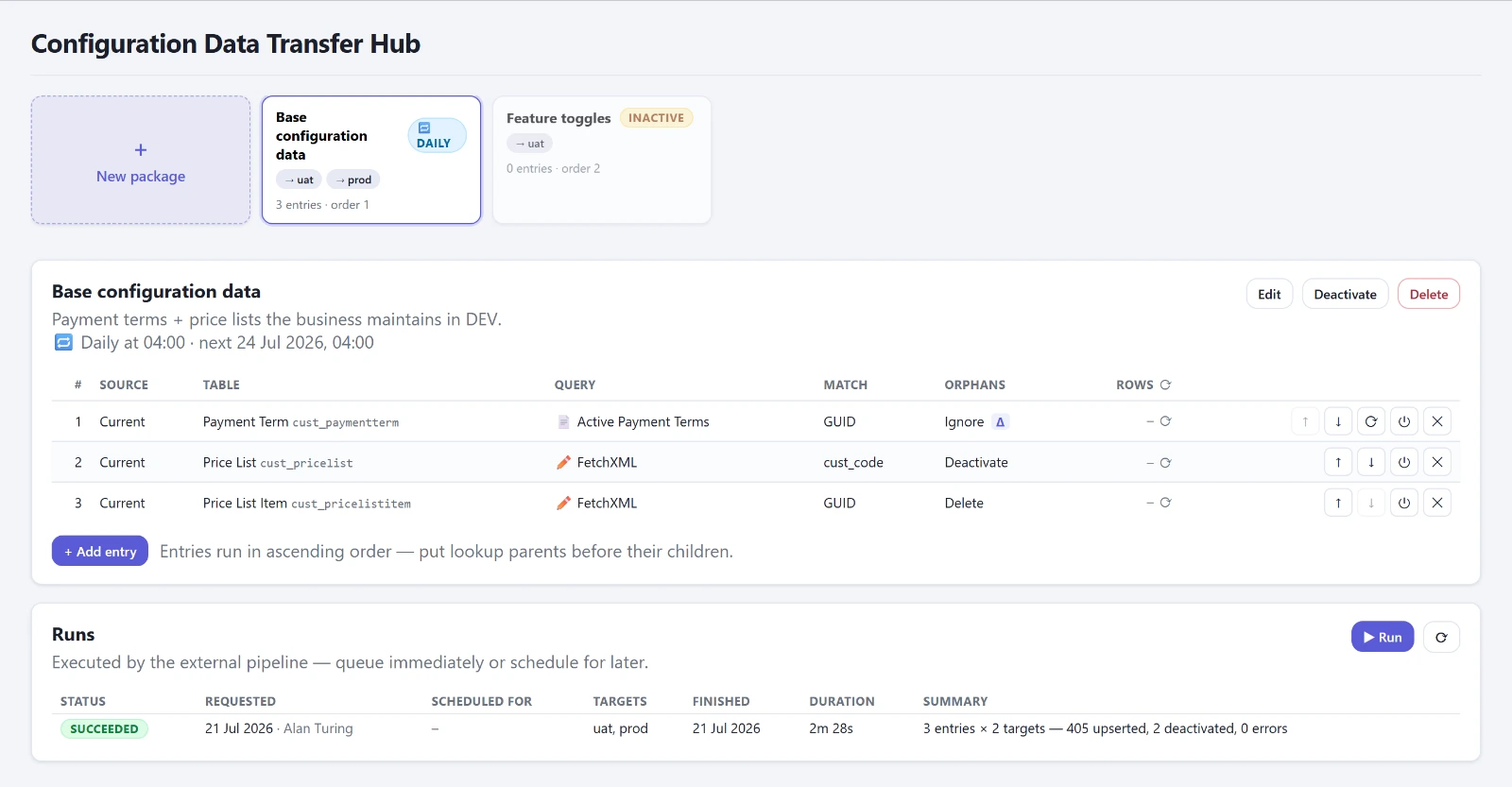
Since early August every entry shows its Write Plan in advance: for each column, whether the executor copies it, binds it as a reference, or skips it with a reason, for example a lookup to a table the package does not transport at all, or only later. An empty plan blocks saving. On top of that came dry runs, scheduling, recurring schedules and delta transfers with a watermark per target environment, so that a run that arrives in UAT and fails in PROD does not skip PROD forever. The watermark is the read time minus two minutes, which covers clock drift and rows that change during the run.
One bug in the log I only saw in August: the counters counted attempts, not results. “6 created, 68 updated” was in reality 16 updates and not a single create. Since August 19 the actual row error is in the log.
Against every environment or not at all.
Looking at the database without a toolbox
The OData Browser was built on July 29, in five steps in one day. Before that it was the FetchXML Builder in XrmToolBox, again a desktop, again a sign-in per environment. Now you pick a table and columns, columns that cannot be selected are grayed out with a reason, the filter builder only offers operators that fit the type, and the query line is editable and linked to the builder. Whatever the builder cannot represent stays exactly as written. A click on a row shows the full record, lookups are clickable, and a tab lists the dependent tables.
It is read-only, and it carries a notice that is not a tooltip but a banner: the queries run as the connector's service account, not as the signed-in user, and so they ignore the user's row- and field-level security. That is why it sits behind the role, and that is why it does not write.
On September 14 I added a SQL tab, since Dataverse offers a T-SQL subset through the Web API. I took it out again the same day. The condition was that it runs against every configured environment, and there is no way to do that: the connector encodes the parameter incorrectly, the native data source only reaches its own environment, and for other environments there is no token. Against every environment or not at all. The finding is in the handbook, so that I don't try it again.
From tool to product
The console was tied to one customer: the customer's prefixes in the data model, environments in a config file, a role name in the code. On June 24 came a data model of its own under the publisher DynamicsPro, and the configuration moved into Dataverse tables. On July 24 the first managed export, version 1.0.0.12, and the same day the setup wizard: if the app starts without configuration, the wizard steps in front, offers the reachable environments, fills in its own, and suggests a publisher and a role. By September 16 there were sixteen releases, up to 1.0.0.29, each with a changelog entry that says what changed and what did not.
Along the way I learned two things that have nothing to do with the app.
The first: a cloud flow that runs in the development environment does not run at the customer after the managed export. The address of the host environment was baked into the flows, at the customer it was unreachable, activation failed with 401, and the designer showed only fourteen of thirty-five actions. The fix is one word: organization: "current" instead of a URL. Version 1.0.0.14, one day after the first.
The second: the active profile of the Power Platform CLI does not survive the switch between two tool calls. On August 5 a version bump landed in a customer's environment instead of my development environment. On August 17 a different customer's profile was active in the middle of a run, and only a second guard stopped the push into that other environment. Since then profile selection, the check of the target URL and the write action belong in a single call, and that is the first item in the handbook.
And then the demo data. An app that is meant to be demoed with sample data must not contain names, tables or organizations of real customers. I cleaned that up in three passes in September, because each time the sweep searched for the spellings it had found last, instead of for the customer's abbreviation. And because in the first pass it had read only 836 kilobytes of the package's 2.17 megabytes, due to a wrong pattern when unzipping. “No hits” only proved that nothing was read. The sweep now always runs with a control search whose hits have to be there. On top of that, an unversioned environment file had baked a customer's DevOps organization into every package ever exported. This is the version the console now takes to other customers.
Where it stands
Twenty-one workspaces in four groups, nine tables, three flows, one role, one package. 379 commits between June 10 and September 21, built alongside client work. Still open are the parallel merge, the Power Platform pipelines and an onboarding wizard that walks new colleagues through the release train. If you want to see everything on one page: the product page lists it. And if you want to see it in your own tenant, write to me.